SaferCar
National Highway Traffic Safety AdministrationAuto & Vehicles
3.8181.00 Reviews
- Version
- 1.4.4
- Installs
- 100.00K
- Age Rating
- Everyone
Screenshots
Our Review of SaferCar
 Analysis by Appyee
When I want a quick safety check before buying a used vehicle, taking a family car on a long trip, or responding to a recall notice, I prefer going straight to the source instead of relying on a random search result. SaferCar is built for that exact habit. It is a free vehicle safety app from the National Highway Traffic Safety Administration, and its focus is practical: helping people find vehicle safety and recall information without turning the process into a research project.
I spent time using it as a reference tool rather than treating it like a daily driving companion. That distinction matters. This is not a navigation app, roadside-assistance service, maintenance tracker, or replacement for a mechanic. Its value is in giving safety information a clear home on your phone. For many drivers, that makes it useful during the occasional moments when accurate recall information matters more than flashy features.
The app is listed for Everyone, costs nothing to use, and has reached over one hundred thousand installs. Its average rating sits at about 3.8 from roughly five hundred ratings, with around two hundred written reviews. Those figures suggest a generally useful but not universally polished experience, which matches my impression: SaferCar can be genuinely helpful, although its usefulness depends on how clearly you know what vehicle information you are trying to check.
How I use SaferCar for a reliable first check
My baseline workflow is simple. I open the app when I need vehicle safety or recall information, identify the vehicle as carefully as possible, and read the result before deciding what to do next. I do not treat a result as a complete diagnosis. Instead, I use it as an early warning and verification step, then contact the manufacturer, dealer, or a qualified repair professional when the situation calls for action.
The most important habit is to slow down during vehicle identification. A model name alone is often not enough for safety information because the same model can have different years, trims, engines, or production details. When I am checking a car that belongs to someone else, I first gather the exact details from the vehicle paperwork or identification label instead of guessing from its appearance. That small step reduces the chance of searching the wrong configuration and assuming the result applies to the car in front of me.
This is especially useful when shopping for a used vehicle. I can check the car before becoming emotionally attached to it or negotiating a price. A recall does not automatically mean I should reject the vehicle, but it does give me a question to ask: has the corrective work been completed, and can the seller provide a clear answer? SaferCar works well in that moment because it turns a vague concern into a specific conversation.
I also find it useful before a long journey in an older family vehicle. I would not wait until the morning of departure if the car is essential, because recall information is only one part of travel preparation. Still, checking ahead gives me a chance to notice an unresolved safety issue and arrange professional advice before loading the car with passengers and luggage.
Another realistic use is after receiving a message or hearing a news report about a possible vehicle problem. Rather than forwarding the message or assuming every car of the same brand is affected, I use the app to check the vehicle details directly. That helps separate a general warning from something that actually concerns my car.
What the app is good at—and what it is not
SaferCar is strongest when I already have a focused question: “Is this vehicle connected to a safety recall?” or “What safety information should I review for this car?” It is less satisfying when I expect a complete ownership dashboard containing service intervals, repair history, insurance records, fuel costs, tire pressure, and maintenance reminders. Those are different jobs, and I would choose a dedicated maintenance app, the manufacturer’s owner portal, or a trusted service center for them.
The app also should not be treated as proof that a vehicle is mechanically safe today. A clean recall result cannot tell me whether the brakes are worn, a tire is damaged, a warning light has been ignored, or a previous repair was carried out badly. That is one of the most important limits to understand. A recall lookup is a safety information check, not a substitute for an inspection.
For that reason, I use the result as part of a repeatable decision process. If I am buying a used car, I combine the app with a vehicle history check, a visual inspection, a test drive, and an independent mechanic’s assessment. If I already own the car, I combine it with the owner’s manual, service records, and direct communication with the manufacturer or dealer. Each source answers a different question.
Settings and preparation that save time
SaferCar is not the kind of app where I need to spend a long time customizing an elaborate profile. The useful preparation happens outside the app: I keep the vehicle identification details accessible, make sure I am checking the correct car, and avoid rushing through the first screen when several vehicles in a household are similar.
For families with more than one vehicle, I recommend creating a small note on the phone with each car’s year, make, model, and identification details. I do not rely on memory, particularly when checking a relative’s vehicle or a car I am considering buying. This is a simple workaround, but it makes the app much more dependable because the quality of the lookup begins with the quality of the information entered.
I also check the app’s version before relying on it for an important decision. The current version is 1.4.4, and it supports devices running Android 7.0 or later. That makes it accessible on many older Android phones, but compatibility is still worth checking if I am using an aging device. I would rather confirm that the app opens and behaves normally at home than discover a problem while standing beside a seller’s car.
Because the app comes from the National Highway Traffic Safety Administration, I see it as an official safety-information channel rather than a community discussion board. That is a strength when I want a more authoritative starting point. At the same time, official information can feel less conversational than a commercial app that explains every result in friendly, step-by-step language. I prefer the authority here, but I still read carefully and follow up when the wording leaves room for interpretation.
Faster patterns for everyday use
Experienced use is mostly about building habits around the app rather than searching for a hidden shortcut. My fastest pattern is to check the vehicle before I need the answer. If I am meeting a seller later in the day, I ask for the vehicle details in advance. If I am preparing for a trip, I check several days before departure. This gives me time to make a phone call or arrange an inspection instead of turning the app into an emergency tool.
When I am comparing multiple used cars, I record the result for each vehicle immediately, along with the seller’s explanation about any recall work. I do not depend on memory after visiting several listings. A short written record helps me distinguish between an unresolved safety issue, a completed repair, and a seller who simply does not know. SaferCar provides the lookup; my note-taking provides the comparison layer the app itself is not designed to be.
I also avoid checking only the vehicle that looks most attractive. In a group of similar listings, I run the same process for every serious candidate. That prevents appearance, price, or a persuasive seller from influencing which car receives the most careful scrutiny. The app becomes more valuable when I use it consistently rather than only after something feels suspicious.
For a household vehicle, I make the check part of an occasional ownership routine. I do not open it every day, because recall information is not a live driving metric. Instead, I revisit it when buying a car, changing ownership, preparing for a major trip, or hearing a credible safety alert. That frequency is realistic and avoids expecting a specialized tool to behave like a constantly updated dashboard.
One useful trade-off is that SaferCar keeps my attention on safety information instead of burying the task under fuel prices, advertisements, social feeds, or unrelated maintenance content. The downside is that I may need another app or website for everything around the lookup. I see that narrow focus as a benefit when I have a specific safety question, but as a limitation when I want one application to manage the entire vehicle.
Where careful users still need outside help
The app cannot resolve every ambiguity on its own. If the vehicle details are incomplete, if the seller gives conflicting information, or if the result raises a concern that affects immediate driving, I do not keep tapping through the app hoping for a mechanical answer. I contact the manufacturer or an authorized dealer and ask what the notice means for that exact vehicle. For a physical symptom, I consult a qualified mechanic.
This is also where I would be cautious about buying a vehicle solely because the app shows no recall information. A recall database and a pre-purchase inspection serve different purposes. A car can have no listed recall and still have poor maintenance, accident damage, worn safety equipment, or problems that have not yet been identified through a formal campaign. SaferCar improves my research, but it does not remove the need for judgment.
Users who want instant roadside assistance may find the app too limited. If my car has stopped on the shoulder, I need emergency services, roadside support, and a mechanic—not a recall lookup. Likewise, drivers who mainly want navigation, fuel tracking, parking, or service reminders should choose tools designed around those tasks. SaferCar is a poor fit when the main goal is convenience during a journey rather than safety research before or after a decision.
There is another practical limitation: information only helps if I act on it. A recall notice sitting unread in an app does not make the vehicle safer. My next step might be scheduling a repair, asking a dealer whether the work was already completed, or stopping use of the vehicle until professional advice is available. The app is best understood as the beginning of that process, not its conclusion.
How it compares with the usual alternatives
The usual alternative is a general web search. That can be faster for broad news, owner discussions, and repair explanations, but it also mixes official information with outdated pages, speculation, and results for similar vehicles. I prefer SaferCar when I want a focused starting point connected to the national vehicle-safety authority.
A manufacturer’s app or owner portal may offer more vehicle-specific ownership tools, such as service scheduling or dealer communication. If I already have a confirmed vehicle account and need to arrange repair work, that route may be more convenient. SaferCar is more useful earlier in the process, particularly when I am evaluating a used vehicle or checking a car that is not registered to me.
Commercial vehicle-history services can add accident, title, mileage, or ownership information, but those services answer history questions rather than replacing a safety recall lookup. I would use the two types of tools together when buying a used car. A history report may reveal what happened to the vehicle, while SaferCar helps me investigate formal safety information. Neither one replaces an inspection.
Community forums are helpful for learning how owners describe a problem in everyday language, but they are not my first source for deciding whether an official safety issue applies to a particular vehicle. I might read owner experiences after checking SaferCar, especially if I want to understand what a repair appointment could involve. I would not let a forum post overrule an official notice or professional advice.
My verdict after building a repeatable routine
SaferCar earns its place on my phone because it handles a narrow but important task without charging for access. The free price removes the main barrier to using it before a purchase or trip, and the Everyone age rating makes it suitable as a household reference tool. Its official origin gives me more confidence than an unverified recall-search application, while its focused design keeps the process from becoming a general automotive information hunt.
I would recommend it to used-car shoppers, parents checking family vehicles, drivers preparing for major travel, and anyone who wants a direct safety-information starting point. I would especially recommend it to people who tend to postpone research until they are already negotiating with a seller. Checking earlier, recording the result, and following up with the right professional turns a small app session into a much stronger buying or ownership habit.
I would not recommend relying on it alone for vehicle condition, maintenance planning, emergency help, or a complete ownership record. Those needs call for other tools and, in some cases, hands-on expertise. The app’s relative simplicity may also disappoint someone expecting a polished all-in-one car companion. Its rating of about 3.8 reflects that it is useful without being perfect, and my experience lands in the same place: practical, focused, and occasionally dependent on what I do after the lookup.
My final advice is to use it deliberately. Keep the correct vehicle details ready, check before a deadline, compare every serious used-car candidate in the same way, and treat any safety notice as a prompt for action rather than a final answer. With that workflow, SaferCar becomes more than a quick search box. It becomes a repeatable safety checkpoint—small, free, and most valuable when I use it before a problem becomes urgent.
Verdict
Strengths of SaferCar
- Helps organize vehicle maintenance records in one convenient place.
- Useful reminders can reduce the chance of missing routine service.
- Makes it easier to track fuel use and recurring vehicle expenses.
- Can support better resale value by keeping maintenance history available.
- Simple vehicle-focused tools may be helpful for everyday car owners.
Limitations of SaferCar
- Some features may depend on accurate user-entered vehicle information.
- Older vehicles may have limited compatibility with certain tools.
- Reminder quality depends on keeping mileage and service data up to date.
- Privacy-conscious users may want to review how vehicle data is stored.
- Advanced diagnostics may require compatible hardware or paid features.
Similar Picks in This Category
View All
Android Auto
Google LLC4.1

maxim — order a taxi & food
PT. SITO4.7

Штрафы ГИБДД: проверка с фото
Pays LLC – Штрафы ГИБДД4.7

Номерограм – проверка авто
Авто Ассист4.8

Дром Авто
Дром4.9

Frequently Asked Questions
What is SaferCar and what does it do?
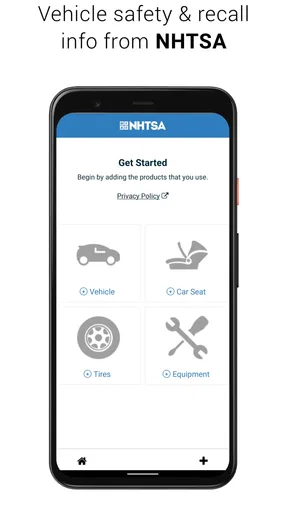
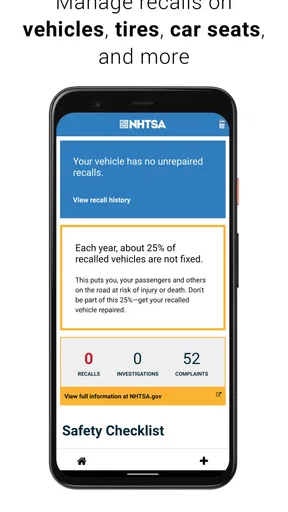
SaferCar is a vehicle-safety information app designed to help drivers and car owners find important safety details in one place. It can provide access to vehicle safety ratings, recalls, investigations, complaints, and other information intended to support more informed decisions. Before relying on any result, check that the vehicle identification details, model year, make, and model are entered correctly.
Can SaferCar check whether my vehicle has an open safety recall?
Yes, SaferCar can be used to look for safety recall information associated with a vehicle, typically by entering its Vehicle Identification Number, or VIN. The results are useful for identifying recalls that may require attention, but they should not replace confirmation from the vehicle manufacturer or an authorized dealer. Recall data may also take time to appear after an announcement.
Is SaferCar free to download and use?
SaferCar is generally available as a free safety-information application, allowing users to access its core lookup and reporting features without paying a subscription. However, availability and functionality can vary depending on the platform, region, and app version. It is still worth reviewing the store listing before installation, especially for current privacy details, permissions, and any changes to supported features.
Does SaferCar replace a mechanic or provide emergency assistance?
No. SaferCar is an information and reporting tool, not a substitute for a qualified mechanic, vehicle inspection, roadside service, or emergency response. If your car shows warning lights, unusual noises, braking problems, smoke, or other dangerous symptoms, stop driving when it is safe and seek professional help. In an emergency, contact local emergency services rather than relying on the app.
What information or permissions does SaferCar require?
The information required depends on the feature you use. Vehicle searches may request details such as the VIN, make, model, or year, while reporting tools may ask for information about a defect or safety concern. The app may also request standard permissions needed for its functions. Before submitting personal or vehicle data, review the privacy policy and avoid entering unnecessary sensitive information.
